| Author |
|
Mash-Tin_UK
Clan Member


Joined: 21 September 2005
Location: United Kingdom
Posts: 1936
|
| Posted: 12 April 2010 at 6:33pm | IP Logged
|

|
|
Okay so i tried this link my mate sent us, it was to do with Xbox Microsoft points, i shudda known better nothing from Microsoft is free, But yer, numpty i am, decided to download a generator, then realised i shouldnt have.
Now everytime on start up, this keeps popping up...
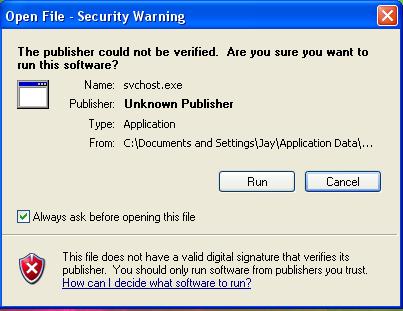
And its starting to piss me off, By the looks of it iv downloaded some Malware or something? The annoying thing is, I can see half of its path up to \Application Data..
Is there anything i can do to stop it  ? ?
|
| Back to Top |


|
| |
Darthbaz
Site Admin


GW2 Leader
Joined: 17 January 2007
Location: United Kingdom
Posts: 2915
|
| Posted: 12 April 2010 at 6:51pm | IP Logged
|
|
|
Is this any help ? clicky
__________________

|
| Back to Top |

|
| |
Mash-Tin_UK
Clan Member
Joined: 21 September 2005
Location: United Kingdom
Posts: 1936
|
| Posted: 14 April 2010 at 6:19pm | IP Logged
|
|
|
Right had a look at that, il save that option till last, that seems all to complicated! basically i want to know how to find the rest of the path from Jay\Application Data\.. Onwards so i can see actually where its booting from, but it never did it before i downloaded sh*tty generator so thats saying to me iv made abit of a cock up downloading something like that. Any other ideas?
|
| Back to Top |
|
| |
Bartaggio
Senior Community Member

Guild Member
Joined: 16 Febuary 2007
Location: Netherlands
Posts: 391
|
| Posted: 14 April 2010 at 8:28pm | IP Logged
|
|
|
You could like do a search for svchost.exe in Application Data. That would probably find it 
|
| Back to Top |
|
| |
Harv
Honourary Member


TF2 GOD
Joined: 24 January 2003
Location: United Kingdom
Posts: 2716
|
| Posted: 14 April 2010 at 11:54pm | IP Logged
|
|
|
I 100% agree with Darth on this one.
The link he provided you seems to be the standard process for getting rid of the virus you seem to have installed on your machine.
I know you dismissed it as being complicated and want other ideas, but yes - viruses are often complicated and require complicated measures to get rid of them. If it were easy to get rid of viruses then the kids wouldn't bother making them, and anti-virus companies wouldn't make so much money making software to counter-act the effects.
To be honest though - there ARE other options that i could go through with you to get rid of this, but trust me - they may be FAR more complicated than what that link suggests above. One would be to download and install a virus checker (AVG is good) - but my suspision is that it may not be possible to complete this due to the virus preventing you from doing so.
My suggestion is - print out the page that Darth has linked for you and follow it word for word. If there is anything that doesn't go to plan or is not what you expect, come back to me and I will help you as much as i can.
Edited by Harv on 15 April 2010 at 12:06am
|
| Back to Top |
|
| |
yuriclaes
Clan Member

Beer Swigger
Joined: 30 August 2008
Location: Belgium
Posts: 733
|
| Posted: 15 April 2010 at 11:56am | IP Logged
|
|
|
U could always format ur PC and reinstall everything, that isnt complicated at all :p
__________________

|
| Back to Top |
|
| |
Mash-Tin_UK
Clan Member
Joined: 21 September 2005
Location: United Kingdom
Posts: 1936
|
| Posted: 15 April 2010 at 5:41pm | IP Logged
|
|
|
Would doin a system restore do anything? Im not sure if its a virus, but im starting to think it is, luckily it asks to run it everytime on start up so i just cancel it
|
| Back to Top |
|
| |
Cock with a soc
Honourary Member

Joined: 05 December 2004
Location: United Kingdom
Posts: 957
|
| Posted: 15 April 2010 at 9:20pm | IP Logged
|
|
|
Come on Mash its only 8 steps its not exactly an essay on Volcanoes dont do a restore it probably wont fix it.
|
| Back to Top |
|
| |
woodster
Clan Member

Guild Officer
Joined: 25 January 2009
Location: United Kingdom
Posts: 334
|
| Posted: 15 April 2010 at 11:14pm | IP Logged
|
|
|
open ur start menu ,use the "run " function ,type "msconfig" then click startup tab . c if its listed there and unclick ,it will also show location . it might not even b a virus i got a couple programs that need to re run,but not usually on startup mind . if once unclicked it dosnt restart i wouldnt worry too much about it ,but if it re appears chances r u have got a virus :P
__________________

|
| Back to Top |
|
| |
woodster
Clan Member
Guild Officer
Joined: 25 January 2009
Location: United Kingdom
Posts: 334
|
| Posted: 15 April 2010 at 11:16pm | IP Logged
|
|
|
hmm and just lookin at the path ,have u updated Java ? looks a java program ???
__________________
|
| Back to Top |
|
| |
woodster
Clan Member
Guild Officer
Joined: 25 January 2009
Location: United Kingdom
Posts: 334
|
| Posted: 15 April 2010 at 11:21pm | IP Logged
|
|
|
and a quick browse found this bit of info
The Svchost.exe file is located in the %SystemRoot%\System32 folder. At startup, Svchost.exe checks the services part of the registry to construct a list of services that it must load. Multiple instances of Svchost.exe can run at the same time. Each Svchost.exe session can contain a grouping of services. Therefore, separate services can run, depending on how and where Svchost.exe is started. This grouping of services allows for better control and easier debugging.
__________________
|
| Back to Top |
|
| |
Mash-Tin_UK
Clan Member
Joined: 21 September 2005
Location: United Kingdom
Posts: 1936
|
| Posted: 17 April 2010 at 6:58pm | IP Logged
|
|
|
Cock with a soc wrote:
| Come on Mash its only 8 steps its not exactly an essay on Volcanoes dont do a restore it probably wont fix it. |
|
|
I know that, i dnt have time to sit at the comp and do that atm hence why i wanted it as a last resort
Will look into it 2moro when i have a day off! cheers lads
Edited by Mash-Tin_UK on 17 April 2010 at 6:59pm
|
| Back to Top |
|
| |
Mash-Tin_UK
Clan Member
Joined: 21 September 2005
Location: United Kingdom
Posts: 1936
|
| Posted: 18 April 2010 at 1:56pm | IP Logged
|
|
|
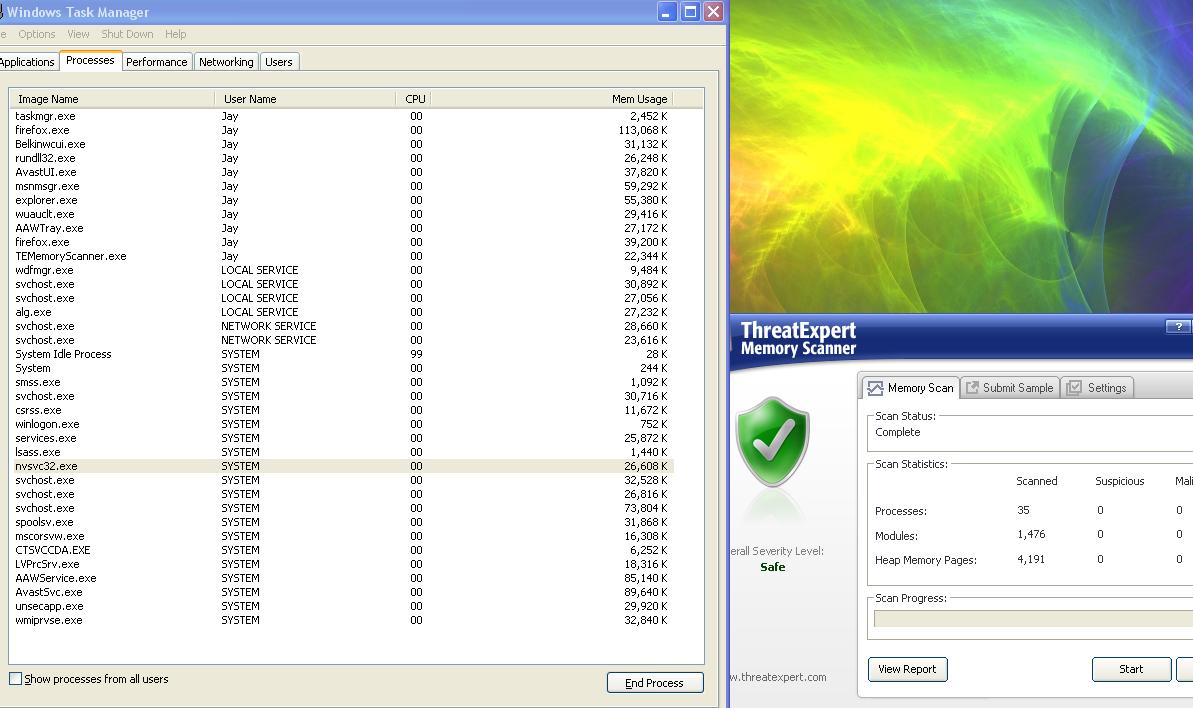
Well i ran Threat Expert and thats found nothing, and i ran the programme on start up to see what it does, Doesnt look like any unusual tasks in the process window!
Edited by Mash-Tin_UK on 18 April 2010 at 2:39pm
|
| Back to Top |
|
| |
woodster
Clan Member
Guild Officer
Joined: 25 January 2009
Location: United Kingdom
Posts: 334
|
| Posted: 18 April 2010 at 3:27pm | IP Logged
|
|
|
u runnin a 32 or 64bit system ?
__________________
|
| Back to Top |
|
| |
Mash-Tin_UK
Clan Member
Joined: 21 September 2005
Location: United Kingdom
Posts: 1936
|
| Posted: 18 April 2010 at 5:07pm | IP Logged
|
|
|
32bit afaik
|
| Back to Top |
|
| |
Darthbaz
Site Admin
GW2 Leader
Joined: 17 January 2007
Location: United Kingdom
Posts: 2915
|
| Posted: 18 April 2010 at 5:31pm | IP Logged
|
|
|
Have you tried running HijackThis? see if that throws up anything
__________________
|
| Back to Top |
|
| |
Nhumrod
Site Admin

Clan Leader & GM
Joined: 09 September 2002
Location: Scotland
Posts: 13897
|
| Posted: 03 May 2010 at 1:23am | IP Logged
|
|
|
svchost.exe generally relates to system processes initiated by Windows and you can drill down to their file handles using process explorer, shich should indicate if theyre dodgy or not (though the fact theyre unsigned sounds v dodgy to me):
http://www.microsoft.com/technet/sysinternals/utilities/processexplorer.html
For future, onjly ever run anything dodgy like keygens etc, in a Sandbox:
http://www.sandboxie.com/
__________________
There is no IRL, there's just AFK.
|
| Back to Top |
|
| |
Mash-Tin_UK
Clan Member
Joined: 21 September 2005
Location: United Kingdom
Posts: 1936
|
| Posted: 03 May 2010 at 10:26am | IP Logged
|
|
|
Cheers D and everyone else!
This is the path that its at, does it look dodgy?
C:\Documents and Settings\Jay\Application Data\Microsoft\svchost.exe
Oh and on the process APP it doesnt show as a Generic Host Process for Win32 Services... Its just a Blank line
Edited by Mash-Tin_UK on 03 May 2010 at 10:27am
|
| Back to Top |
|
| |
Nhumrod
Site Admin
Clan Leader & GM
Joined: 09 September 2002
Location: Scotland
Posts: 13897
|
| Posted: 03 May 2010 at 9:45pm | IP Logged
|
|
|
Yes - v dodgy. Theres only ine svchost.exe on your machin that is safe and its under C:\WINDOWS\system32
__________________
There is no IRL, there's just AFK.
|
| Back to Top |
|
| |
Lafey
Guest


Now Pirate.Tris
Joined: 29 December 2007
Location: United Kingdom
Posts: 0
|
| Posted: 08 May 2010 at 5:55am | IP Logged
|
|
|
mashy, you're a nub!
love youuuuuu!
|
| Back to Top |
|
| |

 Active Topics
  Memberlist
  Invert Colours
  Search
  Help
Help  Register
 |SFH| Sent From Hell :: Community Forums : Hardware / Software Bits & Bobs
 Topic: Unknown Publisher